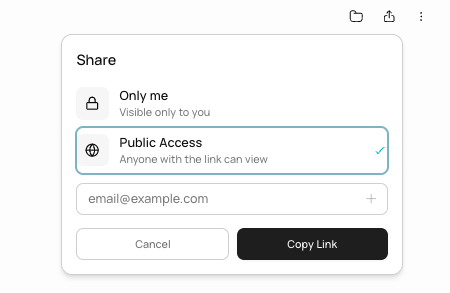
You can share any chat in Runable so others can see the conversation and the results the agent produced. There are two ways to share: with a public link or with specific people by email.
1

Open the share options

In the chat header, click the Share button. A panel appears with sharing options.
Chat header showing the Share button alongside favorite, delete, and rename options
2

Set visibility to public

Toggle the visibility to Public. This generates a shareable link. Anyone with the link can view the conversation and all generated artifacts.
3

Copy and share the link

Copy the link and send it to anyone. They can view the full conversation, including generated slides, websites, images, videos, and other artifacts.

Share with specific people

1

Open the share options

Click the Share button in the chat header.
2

Enter email addresses

Type the email addresses of the people you want to share with. They receive an email notification with a link to the chat.
3

Send the invite

Click Share. The invited users can view the conversation when they sign in.
Shared users can view the conversation and results. They cannot edit, send messages, or modify anything in the chat. Sharing is read-only.

Remove access

To make a public chat private again, go to the share panel and toggle visibility back to Private. The public link stops working immediately. To remove specific users, go to the share panel and remove their email addresses.

Chat management

Beyond sharing, the chat header gives you these options:
ActionWhat it does
FavoriteStar the chat for quick access in the sidebar
RenameChange the auto-generated chat title
DeletePermanently delete the chat, all messages, and the sandbox
Deleting a chat is permanent. All messages, generated artifacts, and the associated sandbox are removed. This cannot be undone.

What you cannot do

  • You cannot give shared users edit access. Sharing is view-only.
  • You cannot share individual artifacts (a single image or slide). Sharing includes the entire conversation.
  • You cannot set an expiration date on a shared link.
  • You cannot share a chat with someone who does not have a Runable account (for email shares). Public links work for anyone.

Next steps