Publish your website to a live URL that anyone can access.
When your website is ready, deploying makes it publicly accessible. The site is hosted on a global edge network, so it loads fast from anywhere in the world.
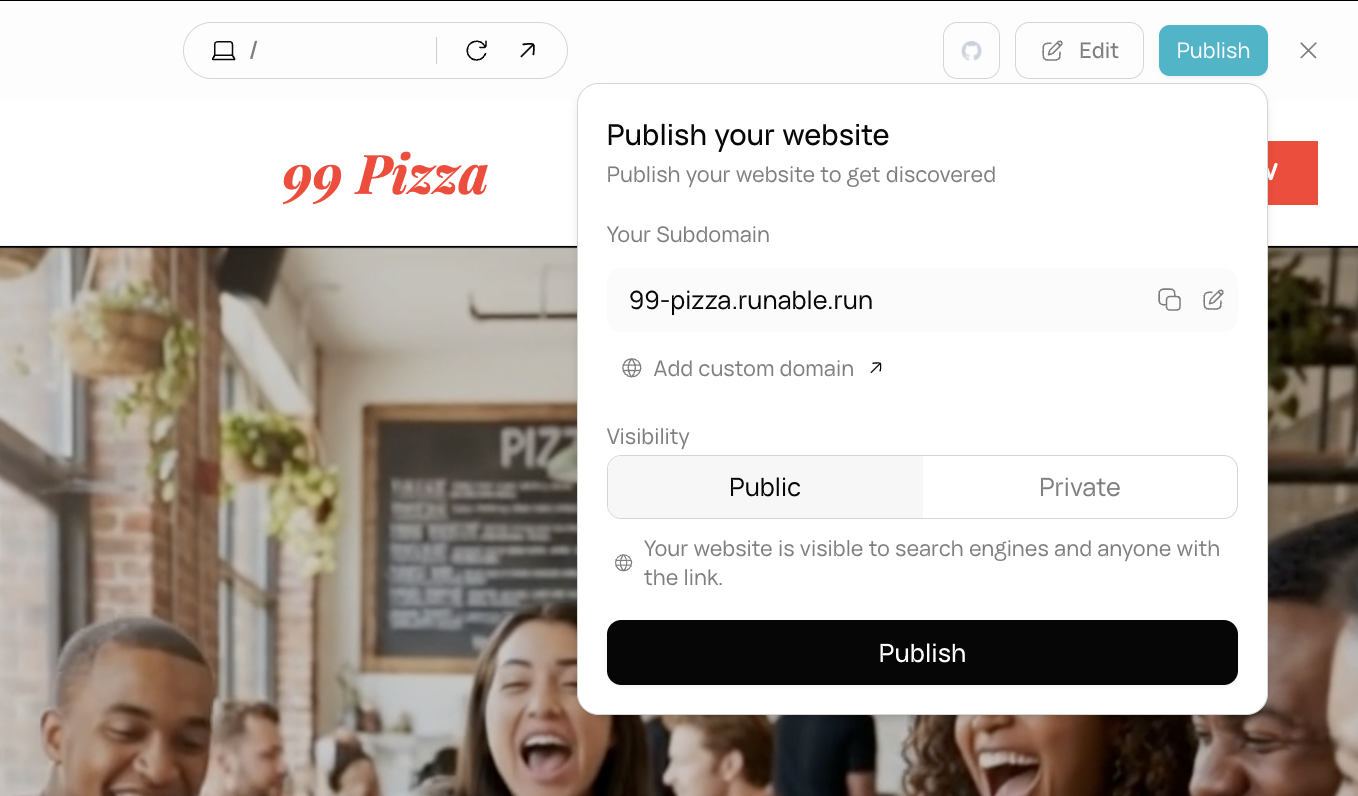
In the website header (above the preview panel), click the Publish button. A panel appears with deployment options.
The Publish button in the website header.
2
Customize your subdomain
Your site gets a default subdomain like bright-ocean-sparrow.runable.site. You can change this to something shorter or branded.
The subdomain customization field in the publish panel.
3
Set visibility
Choose whether your site is public (anyone with the link can access it) or private (restricted access).
4
Publish
Click Publish. The system builds your site, runs database migrations if needed, and deploys it. This takes up to a few minutes.Once deployed, your site is live at https://your-subdomain.runable.site.
Creating and deploying a website does not cost credits. Credits are only used if your website calls the AI gateway for AI-powered features.
When you make changes to your website in the chat, the changes are visible in the live preview but not on the deployed site. To update the deployed site, click Publish again. Each publish creates a fresh build and deployment.
Click the GitHub button in the website header to push your code to a GitHub repository. The agent generates SSH keys and creates the repository for you.