
Website Hosting
Runable lets you build, publish, and host websites directly from the platform. Unlike exporting static code, websites published through Runable are hosted on Runable’s infrastructure. To keep your website online, an active subscription is required.How Hosting Works
When you publish a website, Runable provides the infrastructure required to make it accessible on the internet. This includes:Website Hosting
Your website is hosted on Runable’s infrastructure.
SSL Certificate
Secure HTTPS encryption for your website.
Global Delivery
Fast content delivery through our hosting infrastructure.
Automatic Deployments
Republish changes with a single click.
Do I Need a Subscription After Publishing?
Yes. An active subscription is required to keep your published websites online. Your subscription covers both:- Building your website
- Keeping it hosted after publication
Publishing your website does not make it permanently hosted. Hosting continues as long as your subscription remains active.
What Happens If My Subscription Expires?
If your subscription expires:- Published websites are no longer accessible.
- You won’t be able to publish new changes.
- AI editing features become unavailable.
- Custom domain hosting stops.
What Stays Safe?
Your project files are not deleted when your subscription expires. Your account still retains:- Website project
- Chat history
- Generated files
- Assets
- Project configuration
Custom Domains
Runable supports connecting your own domain. Example:- Open your website project.
- Click Publish.
- Select Add Custom Domain.
- Enter your root domain (without
www). - Follow the DNS instructions provided.
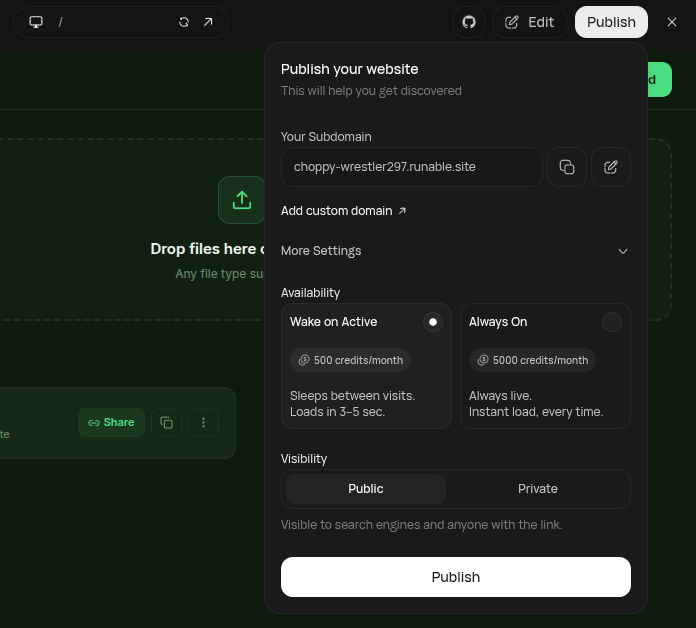
Your custom domain remains connected only while your website is actively hosted through an active subscription.
Can I Export My Website?
Yes. You can export your project’s source code and host it elsewhere if you prefer to manage your own infrastructure. When self-hosting:- Runable no longer hosts the website.
- You’ll be responsible for deployment, hosting, SSL, domains, and maintenance.
Publishing Updates
Whenever you make changes:- Edit your project.
- Preview your changes.
- Click Publish.
Health Checks
Before deployment, Runable performs automated health checks to verify that your project can be published successfully. Health checks may fail if:- Build errors exist
- Required dependencies are missing
- Generated code contains structural issues
- Unsupported configurations are introduced
Frequently Asked Questions
Can I cancel my subscription after publishing my website?
Can I cancel my subscription after publishing my website?
You can cancel your subscription at any time.However, once your subscription expires, your published website will no longer remain online through Runable.
Will my website be deleted?
Will my website be deleted?
No.Your project remains associated with your account.Only the hosted website becomes unavailable until you reactivate your subscription.
Do I lose my custom domain?
Do I lose my custom domain?
No.Your domain remains yours.However, your website will stop resolving through Runable hosting while your subscription is inactive.
Can I publish multiple websites?
Can I publish multiple websites?
Yes.The number of projects and deployments depends on your subscription plan.
Can I host exported code somewhere else?
Can I host exported code somewhere else?
Yes.You can export your project and deploy it to any compatible hosting provider.
Best Practices
Keep Your Subscription Active
An active subscription is required to keep websites hosted on Runable.
Use Preview First
Always test your project in Preview before publishing.
Connect Your Domain
Use a custom domain for a more professional website.
Export Important Projects
Keep local backups of important projects for additional peace of mind.
Summary
Related Guides
- How Credits Work
- Subscriptions Explained
- Lifetime Credits vs Monthly Credits
- Billing FAQ
- Prompt Engineering Guide