
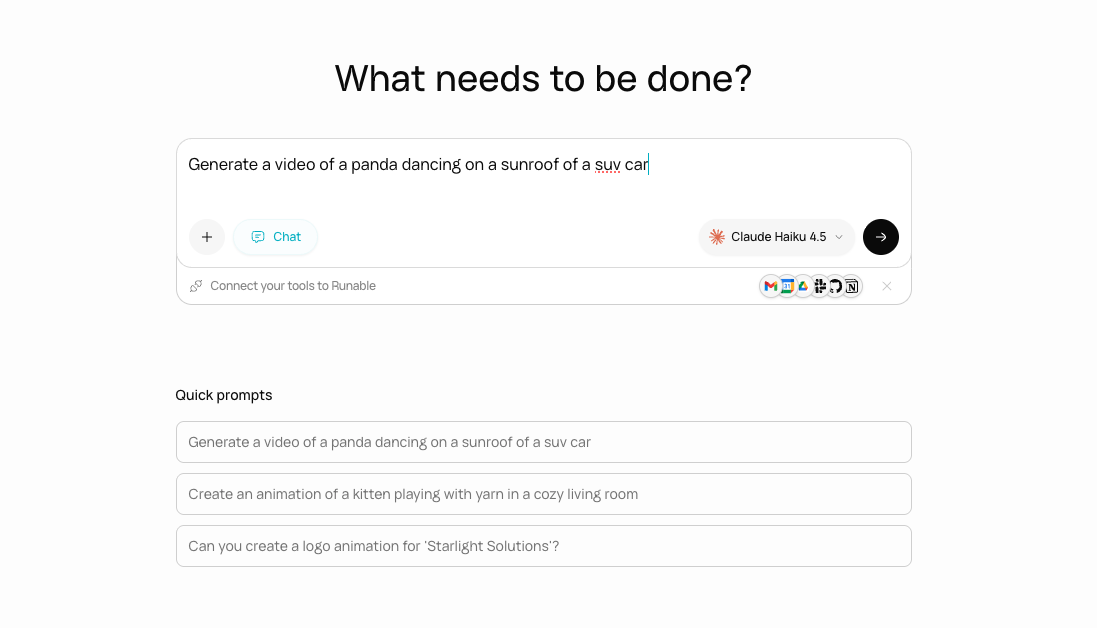
The AI Chat interface with the agent building a project in real time.
Three modes
Agent Mode
The agent writes code, generates media, builds websites, and executes multi-step tasks in a private sandbox.
Chat Mode
Conversational AI. Research, analysis, and Q&A. No building, no code execution.
Plan Mode
The agent researches and writes a detailed plan before building. You review and approve first.
What the agent can do in Agent Mode
The agent has access to tools and built-in skills. It can:- Write and execute code in a private sandbox
- Generate images, videos, and audio
- Build and deploy full-stack websites
- Create presentations, reports, carousels, and spreadsheets
- Search the web for current information
- Read, write, and edit files
- Run bash commands
- Install packages and use any programming language
Key features
Real-time streaming - See everything as it happens
Real-time streaming - See everything as it happens
You see the agent’s work in real time: code being written, commands running, images generating, slides appearing. If your connection drops, the stream resumes where it left off when you reconnect.
File uploads - Attach anything as context
File uploads - Attach anything as context
Upload images, PDFs, documents, spreadsheets, videos, code files, or any other file. The agent uses them as context for your task.
Rollback - Go back to any previous version
Rollback - Go back to any previous version
Every message creates a checkpoint. Click rollback on any previous message to restore the conversation and sandbox to that exact state.
Branching - Try multiple directions in parallel
Branching - Try multiple directions in parallel
Fork the conversation at any point to explore a different approach without losing your current work. Each branch gets its own sandbox and history.
Memory - The agent remembers your preferences
Memory - The agent remembers your preferences
The agent learns your preferences, brand guidelines, and working style across conversations. Say it once and it remembers.
The input bar

The chat input bar with all controls visible.
What AI Chat does not support
- You cannot have two active conversations running simultaneously in the same chat.
- You cannot edit a message after sending it. You can regenerate the agent’s response or rollback.
- You cannot switch between Agent Mode and Chat Mode mid-conversation. The mode is set when the chat is created.
Next steps
Agent Mode
Learn how the agent builds, executes, and delivers in Agent Mode.
Chat Mode
Use Chat Mode for research, analysis, and conversations.