Control which skills the agent can use in your conversations.
You can turn individual skills on or off from the Agent Skills panel. When a skill is disabled, the agent will not load it, even if you type its /command or your prompt matches its description.
Go to Settings → Agent Skills. You can also get there by typing / in the input bar and clicking Manage Skills at the bottom of the dropdown.
2
Find the skill
Your skills are organized into two sections:
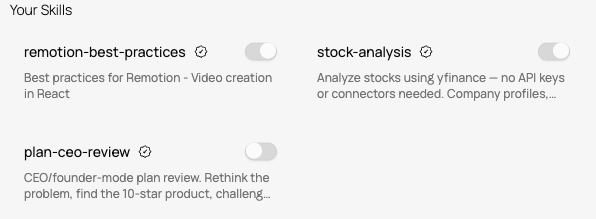
Your Skills - skills from the Runable library, each marked with an Official badge.
Custom Skills - skills you created with Runable or uploaded as a ZIP.
3
Toggle it on or off
Click the toggle switch next to any skill. The change takes effect immediately. A disabled skill will not appear in the / dropdown and the agent will not use it.
Each skill card shows the skill name, a short description, and a toggle switch to enable or disable it.
To permanently remove a custom skill, go to Settings → Agent Skills, find the skill under Custom Skills, and delete it. This removes the skill files from your account and cannot be undone.You cannot delete skills from the Runable library (Your Skills section). You can only disable them.