
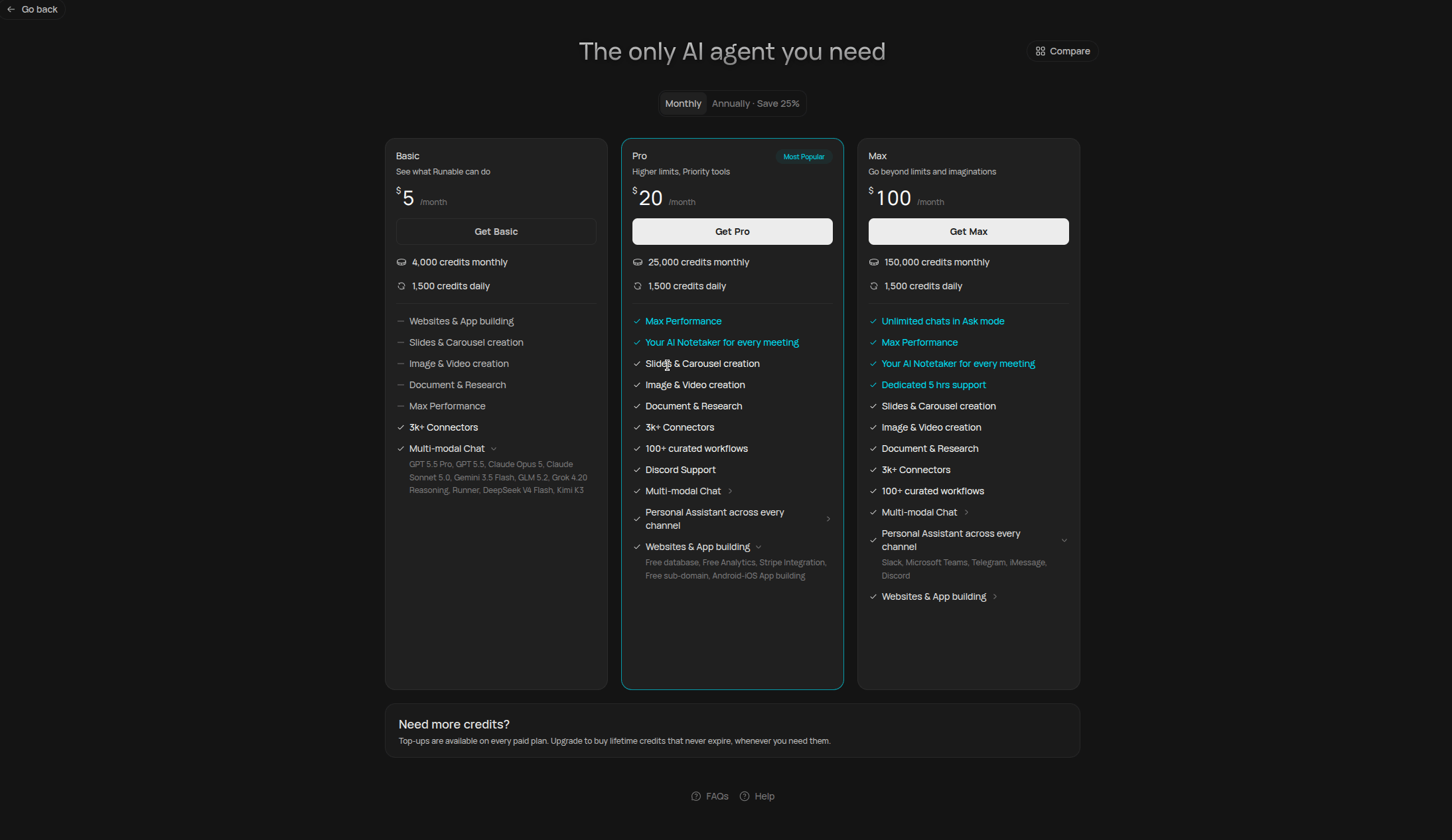
The Runable pricing page showing all available plans.
Plans
All plans include the core Runable features: websites and app building, slides and carousel creation, image and video creation, document and research, Max Performance, 3k+ connectors, and multi-modal chat across frontier models.
Pro adds higher limits and priority tools: the AI Notetaker for every meeting, 100+ curated workflows, Discord support, a personal assistant across every channel, and full app-building extras (free database, free analytics, Stripe integration, free sub-domain, Android/iOS app building).
Max goes beyond limits: unlimited chats in Ask mode, dedicated 5 hrs support, and the personal assistant across Slack, Microsoft Teams, Telegram, iMessage, and Discord.
How credits work
Credits are deducted for every AI operation. The cost depends on what you are doing:Model tiers
When to upgrade
You keep running out of monthly credits
You keep running out of monthly credits
Basic gives you 4,000 credits per month. If you are hitting that limit regularly, Pro raises it to 25,000 per month. If you generate a lot of video or use the Max model tier often, Max at 150,000 per month gives the most room.
You can also top up credits on any paid plan according to your need — top-up credits never expire.
You can also top up credits on any paid plan according to your need — top-up credits never expire.
You generate a lot of video content
You generate a lot of video content
Video generation is one of the most credit-intensive operations, especially at higher resolutions and with audio enabled. Max at 150,000 credits per month is the best fit if video is a core part of your workflow.
Upgrading and downgrading
How do I upgrade my plan?
How do I upgrade my plan?
Go to the pricing page and select a new plan. Upgrades take effect immediately. If you upgrade within the same billing interval (monthly to a higher monthly plan), the cost is pro-rated for the remainder of your cycle. If you switch billing intervals (monthly to annual), a new cycle starts right away.
How do I downgrade?
How do I downgrade?
On runable.com:
- Go to Settings.
- Select Account.
- Click Manage Plan.
- Select Manage.
- Select Cancel Subscription, then downgrade to the Starter plan.
Can I switch to annual billing?
Can I switch to annual billing?
Yes. Switch from monthly to annual at any time from your billing settings. Annual billing saves 25%.
Can I get an invoice?
Can I get an invoice?
Invoices are generated automatically by Stripe after each payment. You cannot get a pre-payment invoice.
Good to know
- Credits cannot be transferred between accounts.
- Consumed credits cannot be refunded.
- You cannot pause a subscription. You can downgrade to a lower tier at any time.
Next steps
View pricing and upgrade
Compare plans side by side and pick the right one for your usage.
How the agent works
Understand the agent loop, sandbox, and real-time streaming.