> ## Documentation Index
> Fetch the complete documentation index at: https://docs.runable.com/llms.txt
> Use this file to discover all available pages before exploring further.
# Sandbox & Code Execution
> Every chat gets a private, isolated sandbox where the agent writes and executes code safely.
Every Agent Mode conversation in Runable runs inside a private sandbox. The sandbox is an isolated environment where the agent can write code, run commands, install packages, and build projects without affecting your computer or anyone else's work.
## How the sandbox works
When you send your first message in Agent Mode, a sandbox is created for that conversation. The agent uses it for every tool call that involves code, files, or execution. The sandbox persists across messages within the same chat, so the agent can build on its previous work.
```mermaid actions={false} theme={null}
%%{init: {'theme': 'base', 'themeVariables': { 'primaryColor': '#e6fafb', 'primaryTextColor': '#1a1a2e', 'primaryBorderColor': '#01b7cb', 'lineColor': '#01b7cb', 'fontFamily': 'Inter, sans-serif', 'fontSize': '14px' }}}%%
flowchart LR
A("You send a message"):::step --> B("Sandbox created or resumed"):::step --> C("Agent runs code"):::step --> D("Results stream back"):::step
classDef step fill:#e6fafb,stroke:#01b7cb,stroke-width:2px,rx:12,ry:12,color:#1a1a2e
```
The agent can install any additional packages using npm, pip, or bun as needed.
## Sandbox lifecycle
| Event | What happens |
| ---------------------------- | ---------------------------------------------------------------- |
| **First message** | A new sandbox is created for the chat |
| **Subsequent messages** | The same sandbox is resumed |
| **45 minutes of inactivity** | The sandbox automatically pauses to save resources |
| **Next message after pause** | The sandbox wakes up and resumes where it left off |
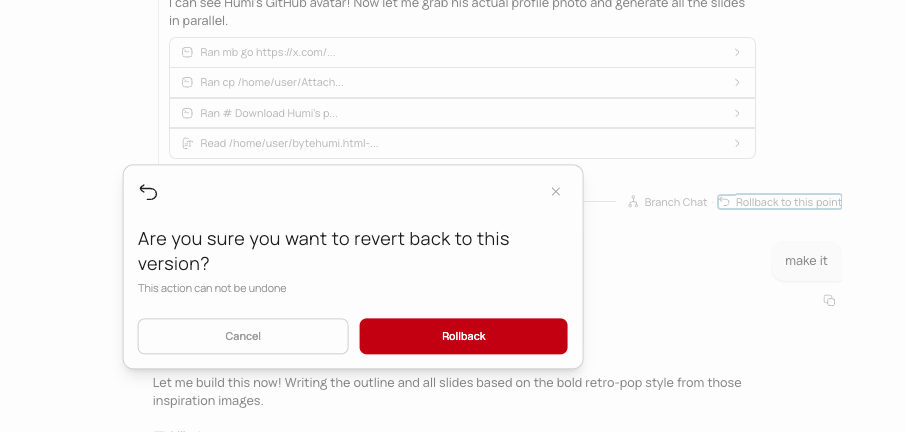
| **Rollback** | A new sandbox is created from the snapshot at the rollback point |
| **Branch** | The new chat gets its own copy of the sandbox |
| **Chat deleted** | The sandbox is permanently destroyed |
## Rollback
After every assistant message, a snapshot of the sandbox is saved. This snapshot captures the complete state of the sandbox: all files, installed packages, running processes, and configuration.
When you rollback to a previous message, the sandbox is restored from that snapshot. Everything, files, code, database state, environment variables, returns to exactly how it was at that point.
## Download your work
You can download the entire sandbox contents as a ZIP file at any time. This gives you the full project source code, generated files, and everything the agent has created.
## What runs in the sandbox
| Operation | Runs in sandbox |
| -------------------------------- | --------------------------------------------------- |
| Writing and editing files | Yes |
| Running bash commands | Yes |
| Building and previewing websites | Yes |
| Generating images and videos | No (runs on AI providers, results saved to sandbox) |
| Web search | No (runs on search infrastructure) |
| Chat conversations | No (runs on LLM providers) |
Image and video generation happens on external AI providers. The generated files are downloaded and saved to the sandbox so the agent can reference and work with them.
## What you cannot do with the sandbox
* You cannot access the sandbox directly from your browser (except through VS Code). All interaction goes through the agent or VS Code.
* You cannot keep a sandbox running indefinitely. It pauses after 45 minutes of inactivity.
* You cannot connect a sandbox to your local machine's file system.
* You cannot run multiple sandboxes for the same chat. Each chat has exactly one sandbox.
* You cannot increase the sandbox's resources (CPU, memory, storage). The environment is standardized.
## Next steps
Learn how rollback and branching use sandbox snapshots to manage versions.
See everything the agent can do inside the sandbox.