> ## Documentation Index
> Fetch the complete documentation index at: https://docs.runable.com/llms.txt
> Use this file to discover all available pages before exploring further.
# How the Agent Works
> You type what needs to be done. The agent figures out how.
You open Runable. You type what you want built. The agent builds it.
That is the entire premise. You do not need to describe how to do it, which tools to use, or what steps to follow. Describe the outcome. The agent handles everything else.
## The loop
Every interaction with the agent follows the same cycle: describe, answer, review, iterate.
```mermaid theme={null}
%%{init: {'theme': 'base', 'themeVariables': { 'primaryColor': '#00b6b6', 'primaryTextColor': '#ffffff', 'primaryBorderColor': '#009999', 'lineColor': '#00b6b6', 'secondaryColor': '#e6fafa', 'tertiaryColor': '#f0fefe' }}}%%
graph LR
A[You describe the outcome] --> B[Agent asks clarifying questions]
B --> C[You answer]
C --> D[Agent builds]
D --> E[You review in the side panel]
E --> F[You ask for changes]
F --> D
```
You type your goal in plain language and hit send. The agent reads your message, figures out what information is missing, and asks before it starts. You answer once. It builds. You see the result live in the right panel and keep talking to refine it.
## What that looks like in practice
Build a website for my fitness studio, CoreFit Studio, in Austin TX. I need a hero section with "Stronger starts here" as the headline, a weekly class schedule grid, a pricing section with 3 membership tiers (Drop-in $25, Monthly $129, Annual \$99/mo), trainer profile cards for 4 instructors, and a contact form. Dark charcoal background with lime green (#84CC16) accents. Mobile-friendly.
The agent asks about things you did not specify: do you need Stripe checkout for the memberships? Should the schedule pull from a database or be static? Do you want a map embed for your location?
You answer. It scaffolds the project, writes the code, starts a live preview, and shows it to you in the side panel. You say "make the pricing cards horizontal instead of stacked" and it updates in place.
Create a 10-slide quarterly review deck for my marketing agency's client meeting with Bright Dental (a chain of 3 dental clinics). Include: Q2 performance summary, Google Ads breakdown by location, Meta campaign results, website traffic trends, SEO keyword rankings, top wins, areas for improvement, Q3 strategy, and next steps. Clean design, navy and teal colors.
The agent asks what data to use for each slide, whether you want charts or tables for the metrics, and what tone the client expects.
You answer. It generates all 10 slides with the right layouts. You can edit any slide directly or ask it to rework specific ones.
Create a 10-second video for my bakery Flour & Fold to promote our weekend croissant special. Close-up of a golden flaky croissant on a rustic wooden board, warm morning light, the croissant breaks apart to reveal chocolate filling. Blurred cafe interior background. 9:16 for Instagram Reels. Generate with audio, soft cafe ambiance.
The agent picks the right video model, sends the request, tracks generation in real time, and delivers the MP4 to your canvas. You can then edit the video, add motion control, or adjust the mood.
Write an 8-page competitive analysis for my freelance web design business in Portland, OR. I specialize in Shopify stores for small e-commerce brands. Analyze 5 local competitors: Pixel & Co, Webcraft PDX, Rose City Digital, Bridge Studio, and NW Design Lab. Cover their services, pricing, client types, strengths, weaknesses, and positioning. End with a recommended strategy for me to differentiate over the next 6 months.
The agent searches the web for current data on each competitor, structures the report, and writes it page by page. You watch each section appear. When done, export as PDF.
## The agent asks first, and the it builds
Most AI tools take your prompt and immediately generate something. If it is wrong, you start over. Runable asks clarifying questions before building anything. That means the output matches what you actually meant on the first try.
You do not need a perfect prompt. A rough description is enough. The agent fills in the gaps by asking you.
## You watch it work in real time
While the agent is running you can stop the agent at any time with the stop button. It halts immediately.
If your connection drops while the agent is working, it keeps going in the background. When you reconnect, the stream picks up where it left off.
## Every chat gets its own sandbox
Each Agent Mode conversation runs in an isolated sandbox environment. The agent can write code, run commands, install packages, and start servers inside it. Your sandbox persists across messages within a chat, so the agent can build on previous work without starting over.
The sandbox auto-pauses after 45 minutes of inactivity and resumes when you send your next message.
## The agent remembers your preferences
Every new chat, the agent checks its memory first. If you have told it your preferences before, it already knows them.
Remember this for all future work: My business is Flour & Fold, a neighborhood bakery in Brooklyn, NY. Brand colors are warm cream (#FFF8F0) and dark brown (#3D2B1F), with coral (#E07A5F) as accent. Font is DM Sans. Tone is warm and inviting. Always include our address (218 Court St, Brooklyn NY 11201) and Instagram handle (@flourandfold).
Every website, deck, carousel, and image starts from those defaults. Preferences change ? Tell the agent and it updates.
## The agent uses skills automatically
When you ask for something specific, the agent loads the right skill, a pre-built workflow with tools and steps for that job.
You never need to pick skills manually unless you want to. To use a skill explicitly, type `/` in the input bar and select one from the dropdown.
## Use Plan Mode for complex projects
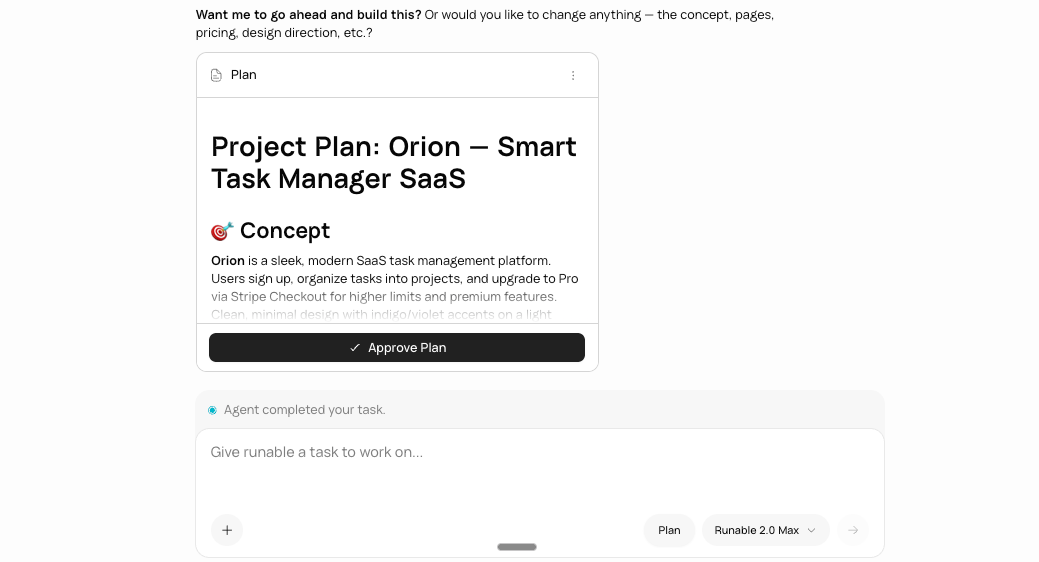
For projects with multiple moving parts, click **Plan** in the input bar before sending your message. The agent researches your request, asks clarifying questions, and writes a structured plan showing what it will build and in what order. You review, adjust, and approve before it starts.
Use it any time your project has more than two or three pieces that need to work together: a website with authentication, payments, and a database. A multi-page report with specific data sources. A workflow that chains multiple tools. Plan Mode catches misalignment before it becomes wasted work.
## Next steps
Understand when to use each mode and what each one can do.
Go back to any point in a conversation or fork it into a new direction.
Set your preferences once and have the agent remember them in every conversation.
Learn how the agent uses skills and how to create your own.