> ## Documentation Index
> Fetch the complete documentation index at: https://docs.runable.com/llms.txt
> Use this file to discover all available pages before exploring further.
# Enable & Disable Skills
> Control which skills the agent can use in your conversations.
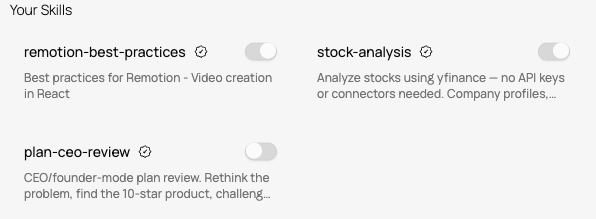
You can turn individual skills on or off from the Agent Skills panel. When a skill is disabled, the agent will not load it, even if you type its `/command` or your prompt matches its description.
## How to toggle skills
Go to **Settings** → **Agent Skills**. You can also get there by typing `/` in the input bar and clicking **Manage Skills** at the bottom of the dropdown.
Your skills are organized into two sections:
* **Your Skills** - skills from the Runable library, each marked with an Official badge.
* **Custom Skills** - skills you created with Runable or uploaded as a ZIP.
Click the toggle switch next to any skill. The change takes effect immediately. A disabled skill will not appear in the `/` dropdown and the agent will not use it.
## When to disable a skill
Most users leave their skills enabled. But there are cases where turning one off helps:
* **You built a newer version of a custom skill.** Disable the old one so the agent does not pick it by mistake.
* **A skill keeps triggering when you do not want it.** If a skill activates on prompts where it should not, toggle it off until you refine its description.
* **You want to test without any custom workflows.** Disabling all custom skills for a conversation lets the agent rely on its built-in capabilities only.
Disabling a skill does not delete it. Toggle it back on at any time and it works the same as before.
## Deleting a skill
To permanently remove a custom skill, go to **Settings** → **Agent Skills**, find the skill under Custom Skills, and delete it. This removes the skill files from your account and cannot be undone.
You cannot delete skills from the Runable library (Your Skills section). You can only disable them.
## Next steps
Learn what skills are, how to use them with the / command, and how to create your own.
Understand the difference between Runable library skills and your custom skills.